# 模块和命名空间
WARNING
模块
- export
- import
- export default
- export = 和 import xx = require()
命名空间
- 定义和使用
- 拆分为多个文件
别名
模块解析
- 相对和非相对模块导入
- 模块解析策略
- 模块解析配置项
export 可以导出变量、函数、类、类型别名、接口
// a.ts
export interface FunInterface  {
	(arg: number) : string
}

export class ClassC {
	constructor() {
	}
}

class ClassB {
	constructor() {
	}
}

export {
	ClassB,
	ClassB as B
}
1
2
3
4
5
6
7
8
9
10
11
12
13
14
15
16
17
18
19
2
3
4
5
6
7
8
9
10
11
12
13
14
15
16
17
18
19
// b.ts
export const name = '小鱼儿'
export const age = 19


// a.ts
export * from './b'
export { name } from './b'
export { name as nameProps } from './b'
1
2
3
4
5
6
7
8
9
2
3
4
5
6
7
8
9
import 语句
// b.ts
export const name = '小鱼儿'
export const age = 19


// index.ts
// 引入部分内容
import { name } from './b'
console.log(name, '引入部分内容')


import * as info from './b'
import { name as nameprops } from './b'

console.log(info)
1
2
3
4
5
6
7
8
9
10
11
12
13
14
15
2
3
4
5
6
7
8
9
10
11
12
13
14
15
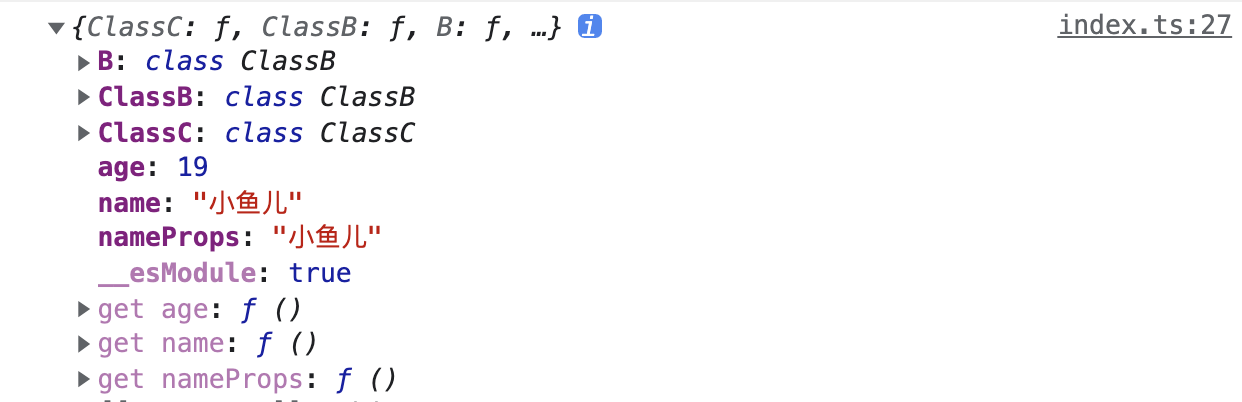
// index.ts
import * as AData from './a'

console.log(AData)
1
2
3
4
2
3
4
export default 一个模块里只能有一个 export default
export default '小于'
1
export = 和 import xx = require()
// c.ts
let name = '小鱼'
export = name


// index.ts
import namec = require('./c')
console.log(namec, 'namec')
1
2
3
4
5
6
7
8
2
3
4
5
6
7
8
# 命名空间
在程序内部,防止污染,想把相关的放到一起的时候,建议使用命名空间。
如果封装了一个工具或者库,要适用于模块系统中的引入的时候,适合使用模块
// space.ts
export namespace Validation {
  const isLetterReg = /^[A-Za-z]+$/

  // 标记为对外可见
  export const isNumberReg = /^[0-9]+$/
  export const checkLetter = (text: any) => {
    return isLetterReg.test(text)
  }
}


// index.ts
import { Validation } from './space'
let isLetter = Validation.checkLetter('abc')
console.log(isLetter, 'isLetter')

// 很奇怪 使用下面的引入会报错
///<reference path = "./space.ts" />
1
2
3
4
5
6
7
8
9
10
11
12
13
14
15
16
17
18
19
2
3
4
5
6
7
8
9
10
11
12
13
14
15
16
17
18
19
拆分到多个文件
// letter-validation.ts
export namespace Validation {
  export const isLetterReg = /^[A-Za-z]+$/
  // 标记为对外可见
  export const checkLetter = (text: any) => {
    return isLetterReg.test(text)
  }
}


// number-validation.ts
export namespace Validation {
  // 标记为对外可见
  export const isNumberReg = /^[0-9]+$/
  export const checkNumber = (text: any) => {
    return isNumberReg.test(text)
  }
}


// index.ts
import { Validation as LetterValidation } from './letter-validation'
import { Validation as NumberValidation } from './number-validation'
console.log(LetterValidation.checkLetter('abc'))
console.log(NumberValidation.checkNumber(123))
1
2
3
4
5
6
7
8
9
10
11
12
13
14
15
16
17
18
19
20
21
22
23
24
25
26
27
28
29
30
2
3
4
5
6
7
8
9
10
11
12
13
14
15
16
17
18
19
20
21
22
23
24
25
26
27
28
29
30
使用别名简化深层次嵌套
// index.ts

namespace Shapes {
  export namespace  Polygons {
    export class Triangle {}
    export class Squaire {}
  }
}
// 使用别名简化深层次嵌套
import polygons = Shapes.Polygons
let triangle = new polygons.Triangle()
console.log(polygons , 'polygons-a')
1
2
3
4
5
6
7
8
9
10
11
12
2
3
4
5
6
7
8
9
10
11
12
模块解析
相对导入模块有三种形式 /、 ./ 、 ../, 其他均为非相对导入。
← ES6和Node中的模块 声明合并 →